
Outback FM80 User Manual

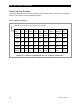





MATE-Class Screens
74 900-0009-01-00 Rev D
Status Screens
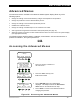
To view the status screens of a FLEXmax 60 or FLEXmax 80 using a MATE, follow the
illustration below. Changes to FLEXmax settings can only be changed from the charge
controller user interface; changes can not be done when viewing these screens on a MATE.
MODE Screens
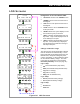
Figure 81 MODE Screens
STATUS/CC/MODE-----P00
charger mode: Silent
DOWN STATUS PORT
STATUS/CC/MODE-----P00
aux relay mode:
Low Batt
DOWN UP TOP PORT
STATUS/CC/MODE-----P00
End of mode menu
UP TOP STATUS
Charge Controller Modes
The MODE screens describe the current operating mode
for the FLEXmax charger (see page 22) and A
UX output
(see page 30).
The FLEXmax has over 25 modes. The MATE can only
display five status messages and may substitute one of the five
for a FLEXmax mode not on this list. Check the FLEXmax
status screen to determine its exact mode.
charger mode:
o
Bulk
o
Absorption
o
Float
o
Silent
o
Equalization
aux relay mode:
o
vent fan
o
pv trigger
o
error output
o
night light
o
float
o
diversion: relay
o
diversion: solid st
o
low batt
(ery)
disconnect
o
remote
aux relay state:
This screen indicates if the AUX output is
o
ON
o
OFF
STATUS----------------
choose device
FX CC DC MAIN
MAIN------------------
1:35:04p
SUM STATUS SETUP ADV
STATUS/CC/PAGE1
MODE METER SETPT PG2
STATUS/CC/MODE-----P00
aux relay state: ON
DOWN UP TOP PORT
Navigation for STATUS/CC/MODE
o
<
STATUS
>
returns to the
STATUS/CC/PAGE1
screen.
o
<
DOWN
>
moves to the next menu item in the diagram.
o
<
UP
>
moves to the previous menu item in the diagram.
o
<
TOP
>
returns to the first
CC/MODE
screen for the
port shown.
o
<
PORT
>
directs the system display to read the next
device (port) on the HUB.