
Outback FM80 User Manual
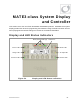
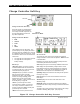


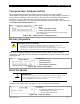


MATE3-Class Screens
68 900-0009-01-00 Rev D
Auxiliary Output (Charge Controller)
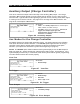
This menu controls the output and functionality of the Auxiliary (A
UX) output. The charge
controller’s A
UX terminals provide a 12 Vdc output that can deliver up to 0.2 Adc to control
external loads. Typical loads include signaling a generator to start, sending a fault alarm signal,
or running a fan to cool the inverter. See page 13 for an image of the A
UX terminals. See
page 30 for a description of A
UX modes.
Figure 66 Auxiliary Output
Aux Modes for the Charge Controller
Aux Modes include nine options with automatic criteria. The options appear in the following
order when the wheel is drawn clockwise. The Vent Fan option appears first if the charge
controller is set at factory default values; otherwise, it will tend to display the last option
selected. (The options are described in greater detail beginning on page 32.)
NOTE: The Remote option allows a MATE3-class system display to use the A
UX output for
AGS (see page 44). AGS is intended for systems with a HUB, inverter, and FLEXmax. If the
system display connects only to a FLEXmax, AGS will only work with DC genset programming.
The other AGS functions will not work properly.
Vent Fan
Figure 67 Vent Fan
PV Trigger
Figure 68 PV Trigger
Error Output
Figure 69 Error Output
Set Points:
o Low Battery Voltage
Set Points:
o Enable Voltage
o Hold Time
o Active: High or Low.
Set Points:
o Enable Voltage
Set Points:
o Status – The Auxiliary Output status is controlled by the
<Off>, <Auto>, and <On> soft keys.
o Aux Mode –Selects one of nine options: Vent Fan, PV
Trigger, Error Output, Night Light, Float,
Diversion:Relay, Diversion:Solid St, Low Battery
Disconnect, and Remot
e
.