
Outback FM80 User Manual
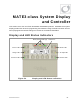


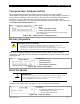
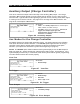


MATE3-Class Screens
62 900-0009-01-00 Rev D
Charge Controller Soft Key
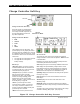
Figure 55 Charge Controller Soft Key Screens
Charge Controller Soft Key
Press this soft key to view FLEXmax
charge controller status information.
If no charge controller is present, the
PV icon will be blank and this soft
key will be inoperative.
Charge Controller Modes:
o Bulk
o Absorb
o Float
o EQ
o Silent
The FLEXmax has over 25 modes. The
system display can only display five status
messages and may substitute one of the five
for a FLEXmax mode not on this list. Check
the FLEXmax status screen to determine its
exact mode.
See page 22 for a description of modes.
See page 98 for a description of
battery charging.
Soft Keys:
<Datalog> brings up a group of charge
controller statistics that are maintained as
a continuous daily log. These screens are
all shown beginning on page 63.
<Graph> brings up a series of screens
that plot various charge controller
information over time. The graphs include
inverter and charger wattage, power
imported from an AC source, battery
voltage, and others. These screens are all
shown beginning on page 64.
<Port> cycles through each device
connected to the network. If more than
one charge controller is installed in the
system, pressing the <Port> soft key will
cycle through each controller.
<Back> returns to the previous screen.
Screen Items:
The upper left corner of the screen shows the FLEXmax
charge controller’s current mode of operation. Bulk
is shown
in this illustration.
In displays the present PV array operating voltage and the
current being harvested from the array.
VOC displays the open-circuit voltage available from the PV.
Out displays the present battery voltage and the current
being delivered from the charge controller(s) to charge the
battery bank. To the right, this line displays the number of
kilowatt-hours and amp-hours accumulated that day.
Operating displays the total hours the charger has operated
that day in any stage.
Float displays the run time of the Float timer when in the
Float stage.
A
bsorb displays the run time of the timer when in the
A
bsorbing stage.
Maximum displays the maximum amperage and wattage
harvested from the PV array that day, and the time both were
recorded.
The lower right corner shows the current status of the charge
controller’s Auxiliary (A
UX) output. (See page 68.)
PV Icon
Charge
Controller’s Mode