
Outback FM80 User Manual




Operation
58 900-0009-01-00 Rev D
Stats
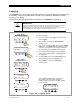
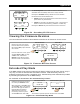
The STATS screen in the main menu displays additional voltage and time information. In a stand-alone FLEXmax
controller — one that is not connected to a system display — Sunrise shows how long ago the FLEXmax woke up for
the first time each day and when the daily and total logged values were updated and cleared. If the FLEXmax is
connected to a system display, the logging occurs at midnight.
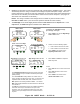
Figure 49 STATS Mode
To view the STATS screen:
1. From the main menu, press <> to move the
arrow next to STATS.
2. Press <GO> to advance to the statistics screens.
Charger Aux Light
EQ Misc Advanced
Logging Stats
EXIT GO
Main Menu
Charger Aux Light
EQ Misc Advanced
Logging Stats
EXIT GO
Max Bat Voc MaxVoc
14.9 036.6 133.0
MaxWatt 0000 Sunrise
EXIT NEXT 01:30:33
Max Bat Voc MaxVoc
14.9 036.6 133.0
MaxWatt 0000 Sunrise
EXIT NEXT 01:30:33
Max Bat Voc MaxVoc
14.9 036.6 133.0
MaxWatt 0000 Sunrise
EXIT NEXT 01:30:33
Max Bat Voc MaxVoc
14.9 036.6 133.0
MaxWatt 0000 Sunrise
EXIT NEXT 01:30:33
Max Bat Voc MaxVoc
14.9 036.6 133.0
MaxWatt 0000 Sunrise
EXIT NEXT 01:30:33
Max Bat Voc MaxVoc
14.9 036.6 133.0
MaxWatt 0000 Sunrise
EXIT NEXT 01:30:33
Maximum historical battery voltage
occurring on the FLEXmax.
The daily high V
oc
value.
The highest historical V
oc
occurring on the FLEXmax.
The maximum wattage
seen by the FLEXmax.
The time the logs were
cleared and reset.
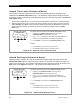
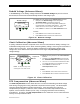
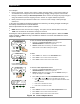
Press <NEXT> to view the second STATS screen.