
Outback FM80 User Manual




Operation
900-0009-01-00 Rev D 47
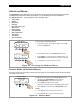
Misc Screen
There are three Misc screens that provide technical information about the operating state of the
system. These are read-only screens and allow for no changes to any of the settings. They do
provide the means to wake up the charge controller if it is in Snooze mode. They also provide a
means to force the charger into a Bulk or Float stage.
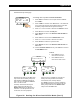
Figure 33 Miscellaneous Screen #1
To access the Misc screens:
1. From the Main Menu, press <> or <> to move the
to the left of the Misc function.
2. Press <GO> to open the Misc screen.
Charger Aux Light
EQ Misc Advanced
Logging Stats
EXIT GO
Main Menu
Misc Screen #1
Charger Aux Light
EQ Misc Advanced
Logging Stats
EXIT GO
GT STATE PWM% ChgT
255 07 50.0 005
EXIT NEXT RSTRT
GT STATE PWM% ChgT
255 07 50.0 005
EXIT NEXT RSTRT
GT STATE PWM% ChgT
255 07 50.0 005
EXIT NEXT RSTRT
GT STATE PWM% ChgT
255 07 50.0 005
EXIT NEXT RSTRT
A
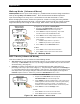
number below GT means the FLEXmax is in grid-tie mode
and communicating with an OutBack grid-interactive inverter.
These numbers are for engineering purposes and are not
significant in normal use. If the inverter is not grid-interactive,
then this number will read 000. (See pages 51 and 104.)
Each MPPT operation has a state which is indicated by a
number. These numbers are for engineering purposes and
are not significant in normal use.
This indicates the percentage of "on" time for the FETs as
they are performing pulse width modulation.
The charge timer (ChgT) counts up to the Absorb
time limit when the charger is in the Absorb stage.
See pages 22 and 52.
GT STATE PWM% ChgT
255 07 50.0 005
EXIT NEXT RSTRT
Press <NEXT> to continue to
the Force Bulk/Float screen.
GT STATE PWM% ChgT
255 07 50.0 005
EXIT NEXT RSTRT
Press <EXIT> to return to the
Main Menu.
Misc Screen #1