
Outback FM80 User Manual




Operation
46 900-0009-01-00 Rev D
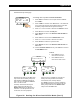
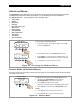
Figure 32 Setting the EQ AUTO Interval
In 11.6V 0.0 A
Out 13.8V 0.0 A
0.000 kW 0.0 kWH
AUX: OFF EQ-MPPT
Status Screen
In 11.6V 0.0 A
Out 13.8V 0.0 A
0.000 kW 0.0 kWH
AUX: OFF EQ 0:00
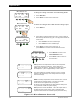
On the Status Screen:
o EQ-MPPT will display to indicate the FLEXmax is trying to reach the
target equalize set point.
o EQ 0:00 in Hours:Minutes will display after the set point is reached.
o After recharging, an EQ DONE message displays and a Float cycle
begins. EQ DONE is displayed until (1) any soft key is pressed, or
(2) a new day occurs for systems using an OutBack system display.
The incomplete equalization cycle continues into the next day unless the
FLEXmax is powered off or manually stopped. The remaining EQ time
can be viewed in the End-of-day Summary screen (see page 20).
EQ cycle terminates when the equalization time period is reached.
In 11.6V 0.0 A
Out 13.8V 0.0 A
0.000 kW 0.0 kWH
AUX: OFF EQ DONE
BATTERY EQUALIZE
1 Hours 15.0 Volts
Check water level
BACK AUTO START STOP
COUNT EQ INTERVAL
000 000
EXIT -DAY +DAY
Equalization Interval
Screen
COUNT EQ INTERVAL
000 000
EXIT -DAY +DAY
Automatic Equalization Mode
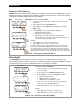
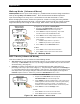
To enable an automatic equalization mode, an interval must be set for the number of days to pass between
equalization cycles. This interval can be between 1 to 250 days. The default equalization interval setting is
000 which disables this feature.
The Equalization Interval screen allows the user to set the interval between equalization cycles. It also
displays how many days of the interval has passed. The COUNT value will be cleared to 000 when an
equalization cycle is started, manually stopped, or if the charge controller has been powered off.
BATTERY
EQUALIZE
START
To enable an automatic EQ cycle:
1. Press <AUTO> to display the equalization interval screen.
2. Use <-DAY> or <+DAY> to set the number of days between
each equalization cycle.
3. Press <BACK> to return to the status screen.
EQ INTERVAL
(1 to 250)
Days of the interval
that have elapsed
Equalization
Interva
l
Screen
To Exit:
o Press <EXIT> once to return to the EQ screen.