
Outback FM80 User Manual




Operation
900-0009-01-00 Rev D 37
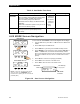
Float (AUX Mode)
This mode is intended to operate a load when the FLEXmax is in the Float stage of charging
the batteries.
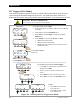
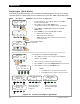
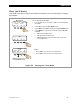
Figure 24 Setting the Float Mode
To set the mode for Float:
1. From the Main Menu, press <> or <> to move the
to the
left of Aux.
2. Press <GO> to open the AUX MODE screen.
3. Press <NEXT> until Float is displayed in the AUX MODE screen.
4. Press <MODE> to cycle through the mode set points ON, OFF,
or AUTO.
o ON activates the A
UX output.
o OFF deactivates the AUX output.
o AUTO controls the output according to the criteria of the
selected A
UX mode.
Charger Aux Light
EQ Misc Advanced
Logging Stats
EXIT GO
Main Menu
Charger Aux Light
EQ Misc Advanced
Logging Stats
EXIT GO
AUX MODE
Float
Output: Off Off
EXIT NEXT SET MODE
<NEXT> proceeds to the
next AUX MODE screen.
To Exit:
o Press <EXIT> once to return to the main menu.
o Press <EXIT> twice to return to the status screen.