
Outback FM80 User Manual




Operation
36 900-0009-01-00 Rev D
Night Light (AUX Mode)
This mode is intended to operate a user-provided, low wattage light for as long as the charge
controller remains in Sleep mode or for the ON time set by the user. OFF is the default value.
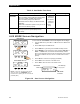
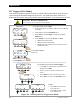
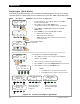
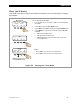
Figure 23 Setting the Night Light Mode
To set the mode for Night Light:
1. From the Main Menu, press <> or <> to move the
to
the left of the Aux function.
2. Press <GO> to open the AUX MODE screen.
The indicates that the mode supports polarity. See page 56.
3. Press <NEXT> until Night Light is displayed in the AUX
MODE screen.
4. Press <MODE> to cycle through ON, OFF, or AUTO.
o ON activates the A
UX output.
o OFF deactivates the AUX output.
o AUTO controls the output according to the criteria of the
selected A
UX mode.
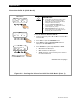
AUX MODE
Night Light
Output: Off Off
EXIT NEXT SET MODE
Charger Aux Light
EQ Misc Advanced
Logging Stats
EXIT GO
Main Menu
Charger Aux Light
EQ Misc Advanced
Logging Stats
EXIT GO
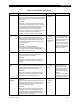
Night Light
Threshold Voltage
010
BACK - +
AUX MODE
Night Light
Output: Off Off
EXIT NEXT SET MODE
Night Light On Time
Hours 23
BACK - +
Night Light
ON Hysteresis Time
Minutes 000
BACK - + OFF
AUX MODE
Night Light
EXIT HYST TIME VOLT
Night Light
OFF Hysteresis Time
Minutes 000
BACK - +
A
djusts the amount of
time the night light
remains on.
A
djusts the threshold of
the voltage that triggers
the function.
<NEXT> proceeds to the
next AUX MODE screen.
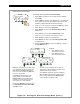
To change the set points for Night Light:
1. Press <SET> to advance to the set point screens <HYST>,
<VOLT>, and <TIME>.
2. Press <–> or <+> to increase or decrease the values.
3. Press <BACK> to return to the ERROR OUTPUT set point screen.
4. Press <EXIT> to return to the AUX Mode screen.
To Exit:
o Press <EXIT> once to return to the main menu.
o Press <EXIT> twice to return to the status screen.
Indicates
Aux Polarity
is Active High