
Outback FM80 User Manual




Operation
900-0009-01-00 Rev D 35
Error Output (AUX Mode)
This mode is useful for monitoring remote sites. It is intended to signal when the charge
controller has not charged the batteries for 26 hours or more or if the battery voltage has fallen
below the threshold voltage for more than 10 minutes. The 26-hour timer can be viewed.
When set as Active Low, it can operate an alarm by sending a signal through a modem to a
computer to alert the operator of the condition.
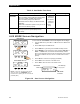
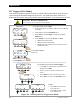
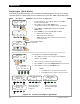
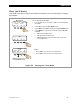
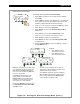
Figure 22 Setting the Error Output Aux Mode
To set the mode for Error Output:
1. From the Main Menu, press <> or <> to move the
to
the left of the Aux function.
2. Press <GO> to open the AUX MODE screen.
3. Press <NEXT> until ERROR OUTPUT is displayed in the AUX
MODE screen.
4. Press <MODE> to cycle through ON, OFF, or AUTO.
o ON activates the A
UX output.
o OFF deactivates the AUX output.
o AUTO controls the output according to the criteria of the
selected A
UX mode.
Charger Aux Light
EQ Misc Advanced
Logging Stats
EXIT GO
Main Menu
Charger Aux Light
EQ Misc Advanced
Logging Stats
EXIT GO
AUX MODE
ERROR OUTPUT
Output: On On
EXIT NEXT SET MODE
AUX MODE
ERROR OUTPUT
Output: Off On
EXIT NEXT SET MODE
AUX MODE
ERROR OUTPUT
01 hrs
EXIT VOLT
ERROR LOW BATT VOLTS
< 11.5
BACK - +
<NEXT> proceeds to
the next
AUX MODE
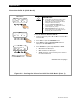
NOTE: To advance to the timer screen, press <SET>. This timer counts up to
the 26-hour limit before the AUX output is activated.
The voltage set point for this mode can also be changed.
To change the set point for ERROR OUTPUT:
1. Advance to the timer screen as noted above.
2. Press <VOLT> to advance to the ERROR LOW BATT
VOLTS screen.
3. Press <–> or <+> to increase or decrease the value.
4. Press <BACK> to return to the ERROR OUTPUT set point screen.
5. Press <EXIT> to return to the AUX Mode screen.
To Exit:
o Press <EXIT> once to return to the main menu.
o Press <EXIT> twice to return to the status screen.