
Outback FM80 User Manual




Operation
34 900-0009-01-00 Rev D
PV Trigger (AUX Mode)
This mode is intended to operate an alarm, or relay that disconnects the PV array, when PV
input exceeds the threshold voltage set by the user. The mode turns off the alarm or PV
disconnect after the PV voltage decreases below the threshold for a time period set by the user.
CAUTION: Hazard to Equipment
Do not exceed 150 Vdc or the FLEXmax could be damaged.
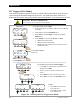
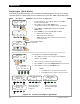
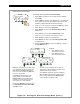
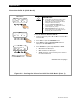
Figure 21 Setting the PV Trigger Aux Mode
To set the mode for PV Trigger:
1. From the Main Menu, press <> or <> to move the to the
left of Aux.
2. Press <GO> to open the AUX MODE screen.
3. Press <NEXT> until PV Trigger is displayed in the AUX
MODE screen.
4. Press <MODE> to cycle through ON, OFF, or AUTO.
o ON activates the A
UX output.
o OFF deactivates the A
UX output.
o AUTO controls the output according to the criteria of the
selected A
UX mode.
AUX MODE
PV Trigger
Output: Off Off
EXIT NEXT SET MODE
Charger Aux Light
EQ Misc Advanced
Logging Stats
EXIT GO
Main Menu
Charger Aux Light
EQ Misc Advanced
Logging Stats
EXIT GO
AUX MODE
PV Trigger
EXIT TIME VOLT
PV VOLTS
> 140
BACK - +
AUX MODE
PV Trigger
Output: Off Off
EXIT NEXT SET MODE
Hold Time Sec
01.1
BACK - +
<NEXT> proceeds to the
next AUX MODE screen.
To change the set points for PV Trigger:
1. Press <SET> to advance to the set points screens;
<VOLT> and <TIME>.
2. Press <–> or <+> to increase or decrease the
values.
3. Press <BACK> to return to the set point screen.
4. Press <EXIT> to return to the AUX Mode screen.
To Exit:
o Press <EXIT> once to return
to the main menu.
o Press <EXIT> twice to return
to the status screen.
Indicates Aux Polarity is
A
ctive High