
Outback FM80 User Manual




Operation
32 900-0009-01-00 Rev D
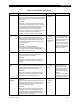
Table 2 Aux Mode Functions
Mode Name Function/Purpose Set Points Aux Polarity
Low Battery
Disconnect
Function:
When the battery voltage falls below the threshold
disconnect voltage, the AUX output activates.
When the battery voltage rises above the
threshold reconnect voltage, the AUX deactivates.
Purpose:
This mode is intended to operate a relay to turn off
loads and save battery capacity.
Threshold
Voltage for
disconnect
Threshold
voltage for
reconnect
Time
delay
Not Available
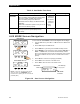
Remote Allows an OutBack system display to control the
AUX output (see the system display manual
for details).
None Not Available
AUX MODE Screen Navigation
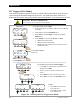
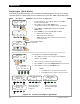
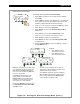
Figure 19 Aux Screen Navigation
To access the AUX MODE screen and adjust the settings:
1. From the Main Menu, press <> or <> to move the to the left
of Aux.
2. Press <GO> to open the Aux screen.
3. Press <NEXT> to cycle through the available auxiliary modes.
4. Press <MODE> to cycle through the mode set points ON, OFF, or
AUTO. In AUTO mode, the function will automatically activate
when a user-determined value is met and deactivate (or shut down)
when other conditions are met, such as a certain amount of time
passing.
5. Press <SET> to select the set point(s) (if available).
6. Press <EXIT> once to return to the main menu.
7. Press <EXIT> twice to return to the status screen.
Charger Aux Light
EQ Misc Advanced
Logging Stats
EXIT GO
Main Menu
AUX MODE
Night Light
Output: Off Off
EXIT NEXT SET MODE
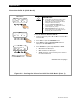
AUX MODE Screen
Charger Aux Light
EQ Misc Advanced
Logging Stats
EXIT GO
NOTE: If more than 10 minutes have passed
since any activity, the PASSWORD screen
becomes active, requiring the user to reenter the
p
assword
(
141
)
.
AUX MODE
Night Light
Output: Off Off
EXIT NEXT SET MODE
Aux Polarity
See page 56.
AUX MOD
E
Set Point
AUX MOD
E
Name