
Outback FM80 User Manual



Operation
900-0009-01-00 Rev D 29
Charger Screen
Charging settings should follow the battery manufacturer's recommendations. This screen
allows changes to the recharging voltage set points if the default settings do not match the
battery manufacturer's recommendations. (For an explanation of battery charging, see pages
98 and 99).
o
Current Limit
o
Absorbing
o
Float
The default charger output current limit setting is:
o
80 amps for the FM80, and
o
60 amps for the FM60.
This setting is adjustable from 5 to 80 amps.
IMPORTANT:
Check the battery manufacturer’s recommendations for the optimal charging settings for
the type of batteries being used.
An appropriate circuit breaker, or overcurrent device, must be used between the battery
and the FLEXmax.
If a battery remote temperature sensor (RTS) is used, set the Absorbing and Float
setting voltage based on a 25°C/77°F setting. RTS compensated voltage values can be
viewed in the
Advanced menu screen under the RTS Compensation heading.
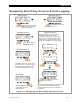
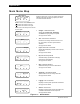
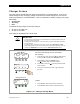
Figure 18 Charger Setup Menu
Charger Aux Light
EQ Misc Advanced
Logging Stats
EXIT GO
Current Limit 80A
Absorbing 14.4V
Float 13.8V
EXIT
- +
To access the Charger screen and adjust
the settings:
1. From the main menu, press the <> or <> soft key
to move the to the left of the Charger function.
2. Press <GO> to open the Charger screen.
The indicates which set point is selected.
3. Press <> to move the to the set point that needs
to be changed.
4. Press <+> to increase the value or (–) to decrease
the value.
Charger Aux Light
EQ Misc Advanced
Logging Stats
EXIT GO
Main Menu
Charger Screen
To Exit:
o Press <EXIT> once to return to the main menu.
o Press <EXIT> twice to return to the status screen.