
Outback FM80 User Manual



Operation
28 900-0009-01-00 Rev D
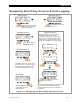
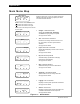
Main Menu Map
Figure 17 Main Menu
From the main menu, a user can choose among the
following FLEXmax functions by aligning the arrow
next to the desired selection.
o Charger—CHARGER SETUP
Adjusts the Current Limit, Absorbing,
and Float recharging voltage set points.
See page 29 for details.
o Aux—AUX OUTPUT CONTROL
Provides a secondary control circuit for a vent
fan, error alarm, and other system-related
additions.
See page 30 for details.
o Light—BACKLIGHT CONTROL
Adjusts the backlighting of LCD screen and soft
key buttons.
See page 44 for details.
o EQ—BATTERY EQUALIZE
Activates battery equalization recharging
(manually or automatically).
See page 45 for details.
o Misc—MISCELLANEOUS
Additional settings and service information.
See page 47 for details.
o Advanced —ADVANCED MENU
Optimizes/fine-tunes the charge controller.
See page 49 for details.
o Logging—DATA LOGGING
Displays recorded power production information.
See page 57 for details.
o STATS—STATISTICS
Displays recorded peak system information and
cumulative kilowatt-hours and amp-hours.
See page 58 for details.
Charger Aux Light
EQ Misc Advanced
Logging Stats
EXIT GO
Main Menu
Charger Aux Light
EQ Misc Advanced
Logging Stats
EXIT GO
Charger Aux Light
EQ Misc Advanced
Logging Stats
EXIT GO
Charger Aux Light
EQ Misc Advanced
Logging Stats
EXIT GO
Charger Aux Light
EQ Misc Advanced
Logging Stats
EXIT GO
Charger Aux Light
EQ Misc Advanced
Logging Stats
EXIT GO
Charger Aux Light
EQ Misc Advanced
Logging Stats
EXIT GO
Charger Aux Light
EQ Misc Advanced
Logging Stats
EXIT GO
Charger Aux Light
EQ Misc Advanced
Logging Stats
EXIT GO
<EXIT> returns to the Status screen.
<> moves the cursor to the left.
<> moves the cursor to the right.
<GO> goes to the setup screen for the
chosen option.