
Outback FM80 User Manual



Operation
900-0009-01-00 Rev D 19
Status Screen
The status screen displays system information. See page 20 for detailed information of the
different modes of operation.
The optional OutBack system display shows CC (Charge Controller) status screens for
convenient distant viewing from the installation location. See page 61 for the FLEXmax screens
displayed on the MATE3 or MATE3s. Please see pages 73 to 85 to view the FLEXmax screens
displayed on the MATE or MATE2.
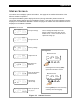
Figure 11 Status Screen
In 11.6V 0.0 A
Out 13.8V 0.0 A
0.000 kW 0.0 kWH
AUX: OFF Sleeping
Status Screen
The PV voltage will slowly rise to the
battery voltage level even when the PV
breaker is off — this is normal as the PV
capacitors charge up.
In 11.6V 0.0 A
Out 13.8V 0.0 A
0.000 kW 0.0 kWH
AUX: OFF Sleeping
In 11.6V 0.0 A
Out 13.8V 0.0 A
0.000 kW 0.0 kWH
AUX: OFF Sleeping
In 11.6V 0.0 A
Out 13.8V 0.0 A
0.000 kW 0.0 kWH
AUX: OFF Sleeping
In 11.6V 0.0 A
Out 13.8V 0.0 A
0.000 kW 0.0 kWH
AUX: OFF Sleeping
In 11.6V 0.0 A
Out 13.8V 0.0 A
0.000 kW 0.0 kWH
AUX: OFF Sleeping
In 11.6V 0.0 A
Out 13.8V 0.0 A
0.000 kW 0.0 kWH
AUX: OFF Sleeping
In 11.6V 0.0 A
Out 13.8V 0.0 A
0.000 kW 0.0 kWH
AUX: OFF Sleeping
PV Input Voltage
PV Input Current
Battery Voltage
Output Current
Instantaneous
Kilowatts
Daily Accumulated
Kilowatt-hours
AUX Status
(ON or OFF)
Mode of Operation
See page 22
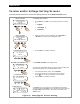
Pressing SK2 opens the end-of-day
summary menu and logging.
In 11.6V 0.0 A
Out 13.8V 0.0 A
0.000 kW 0.0 kWH
AUX: OFF Sleeping
Status Screen
In 11.6V 0.0 A
Out 13.8V 0.0 A
0.000 kW 0.0 kWH
AUX: OFF Sleeping
Status Screen
Pressing the first soft key (SK1)
opens the main menu screen.
Navigation