Use Instructions
Manuals
Brands
OTTO Engineering Manuals
Electronics
OTTO Lynq PRO
1
2
3
4
5
6
7
8
9
10
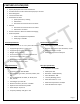
Table Of Contents
Lynq PRO™ Instructions for Use
Introduction
Supplies Equipment and Parts List
Features of Lynq Pro
Basic operations
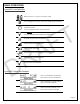
Lynq PRO™ Icon Definition
Lynq PRO™ Status Bar Examples
Lynq PRO™ Button Functions
Charge device
Powering On
Powering Off
Acquiring GPS Signal
Calibrate Compass
Lynq PRO™ Name Entry
Network Settings
Network Settings – Pairing
Device Settings
Land/Nav
Settings
My View
Team View
LynQ View
Markers/Waypoints
Markers - Edit Name
Markers - Edit Location
Markers - Edit Alarm
Waypoints
Waypoints - Load
Messages
Messages - Send
Messages - View
ATAK Connect
Notes
Page |
6
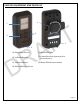
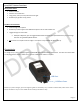
SUPPLIES
EQUIPM
ENT AND PARTS LI
ST
A)
M
ENU
/S
EL
ECT
B
UTTO
N
E)
R
OTATING
B
ELT
C
LIP
B)
U
P
/D
OWN
B
UTTONS
F)
C
HARGE
/D
ATA
P
O
RT
(
USED WIT
H
F
IELD
D
EPLOYMENT
K
IT
)
C)
F
RONT
LIGHT
D
ISP
LAY
G)
M
ICRO
USB
C
ABLE
(
NOT SHOWN
)
D)
M
ICRO
USB
P
ORT W
/C
OVER
A
B
C
D
E
F
DRAFT
1
...
...
4
5
6
7
8
...
...
33