
Use Instructions

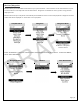

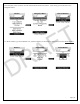


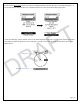
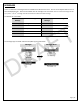

Table Of Contents

Page | 22
Markers/Waypoints
Markers allow you to add additional locations to your personal device. These locations can be entered based on your
current location or manually with a known GPS location. Waypoints are loaded into the Lynq PRO™ using the field
deployment kit.
Markers will show up on “My View” automatically and available for view in Team and LynQ Views. Waypoints must be
loaded and will be displayed on “Team View” and “LynQ View”.
Land/Nav Menu
Navigation
Navigation Menu
No Markers or Waypoints
entered in device
Select “View Marker” to see a list of all the markers that have been entered into the device. To add a new Marker,
select “Enter New Marker”.
Navigation Menu
Markers
Enter New Marker
DRAFT