
Use Instructions
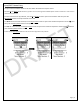
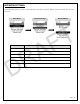

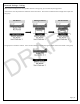

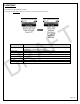
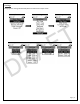

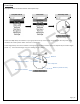
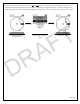
Table Of Contents

Page | 16
LAND/NAV
Personal or group navigation on land.
Double tap the Menu/Select button to exit any screen and go back to the previous.
Main Menu
Land/Nav Menu
Menu Header
Description
My View
Compass view of personal Lynq PRO™
2 view options: Horizontal and Vertical
Team View
Compass view of team member approximate locations
LynQ View
Custom LynQ view of specific team member location
Altitude
View displaying your or specific team member altitude and bearing.
Members
Non-Graphical detail view of specific team members
Navigation
Menu showing current Markers and Waypoints
Messages
Send, delete, or view messages
Settings
Change map settings
DRAFT