
Use Instructions
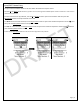
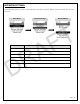

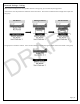

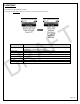
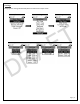

Table Of Contents

Page | 15
DEVICE SETTINGS
The Device Settings menu allows the user to configure a number of options on the Lynq PRO™.
Device Settings
Menu
Menu Header
Description
Coordinates
Change the display format between Lat/Long and MGRS
Distance
Change the display format between Imperial and Metric
Temperatures
Change the display format between Celsius and Fahrenheit
Constellations
Change between GPS only or GNSS (Fused system of GPS & GLONASS)
Time Settings
Allows you to manually set the time, date and time zone or use the GNSS
system to set these values.
USB Mode
o Communication: Normal operating mode of the Lynq PRO™
o Storage: Option to turn the Lynq PRO™ into an external storage
device when tethered to another device via USB
GNSS View Lock
This provides the ability to disable the “My View” application.
Note: To restore this view requires access to the OTTO Deployment Kit.
About
Lists firmware versions and any regulatory information
DRAFT