
Use Instructions

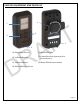
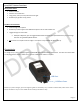
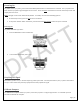
Table Of Contents

Page | 10
Powering On
To power on the Lynq PRO™, press and hold the Menu/Select button on the device for 3 seconds. The Lynq PRO™ will
boot and the Lynq PRO™ logo will appear on the screen. Press the Down arrow button to remove the startup screen and
display the main menu.
Note: The light on the screen will be off by default. To enable, use one of the following options.
• At the startup screen, press the Up arrow on the device.
• At any other location within the device, press and hold the Menu/Select button for up to 3 seconds
Powering Off
To power down the Lynq PRO™:
1. From the Main Menu select “Power Off”.
2. In the Power Off window, select “Yes”.
Acquiring GPS Signal
Once the Lynq PRO™ is on, it will start acquiring a GPS system lock. For best performance, the Lynq PRO™ should be in
an open environment away from any equipment that may impede the signal.
Calibrate Compass
To calibrate the compass on the Lynq PRO™, move the Lynq PRO™ in a figure eight motion. It could take up to 30
seconds to calibrate the compass.
DRAFT