
Home Theater System User Manual





Doc. 065291-01 3/09 11
2•Features
This chapter describes key ICS-2100 features and introduces the Chromeleon user
interface.
2.1 Operating Features
2.1.1 Front Panel
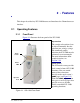
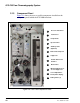
Figure 2-1 illustrates the front panel of the ICS-2100.
Injection Port
The sample to be analyzed can
be injected manually into the
injection port, using a syringe.
For automated sample
injection, the ICS-2100 must be
connected to an autosampler.
For more information about
sample injection, see
Section 3.10
.
Touch Screen
The LCD touch screen provides
local control of most ICS-2100
functions. You can control
many of these functions
directly on the touch screen’s
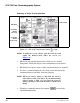
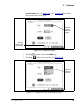
HOME page (see Figure 2-2).
From the
HOME page, you can
also go to a series of pages that
provide access to all other
locally controlled ICS-2100
operating functions.
Figure 2-1. ICS-2100 Front Panel
Injection
Port
Power
LED
Touch
Screen