
Home Theater System User Manual



ICS-2100 Ion Chromatography System
154 Doc. 065291-01 3/09
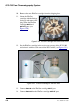
10. Remove the new EluGen cartridge from the shipping box.
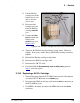
11. Orient the EluGen
cartridge with the fittings
facing up and remove the
plugs from the EluGen
cartridge
INLET and
OUTLET ports (see
Figure 5-50
).
Figure 5-50. EluGen Cartridge Inlet and Outlet Ports
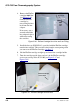
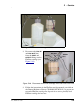
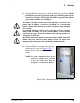
12. Set the EluGen cartridge in the service area on top of the ICS-2100
and orient it with the cable toward the EGC holder (see Figure 5-51
).
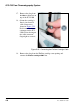
13. Connect
EGC IN to the EluGen cartridge INLET port.
14. Connect
EGC OUT to the EluGen cartridge OUTLET port.
Figure 5-51. EluGen Cartridge in Service Area
OUTLET
INLET
EluGen
Cartridge
Cable