
Home Theater System User Manual



5•Service
Doc. 065291-01 3/09 149
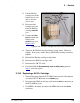
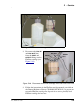
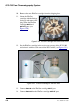
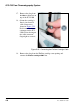
19. Remove the plug from the EluGen cartridge vent opening and
connect the EluGen cartridge
VENT line.
Recording the EluGen Cartridge Serial Number in Chromeleon
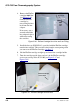
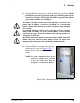
The serial number is printed on the EluGen cartridge label.
1. Open the Chromeleon Server Configuration program (select Start >
All Programs > Chromeleon > Server Configuration).
2. Double-click the ICS-2100 system icon. The properties dialog box for
the ICS-2100 appears.
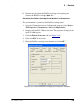
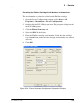
3. Click the Eluent Generator tab (see Figure 5-44
).
4. Select the EGC-1 check box.
5. Enter the EluGen cartridge serial number and click OK.
Figure 5-44. Eluent Generator Configuration Properties Example