
Home Theater System User Manual





ICS-2100 Ion Chromatography System
140 Doc. 065291-01 3/09
5.16.2 Priming with the Prime Button
NOTE Perform this procedure after priming the eluent
lines (see Section 5.16.1
).
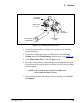
1. Check that the priming valve on the primary pump head is closed (see
Figure 5-32
).
2. Open the waste valve on the secondary pump head by turning the
knob one-quarter to one-half turn counterclockwise (see Figure 5-32
).
Opening the valve directs the eluent flow path to waste and eliminates
backpressure.
3. In the Pump Settings window (see Figure 3-6
), click the Prime
button. Confirm that the waste valve is open by clicking OK when the
reminder message appears. The pump will begin pumping at about
3mL/min.
4. Continue priming the ICS-2100 until no air bubbles are exiting the
pump waste line.
5. In the Pump Settings window, click Pump Off.
6. Close the waste valve. Do not overtighten the valve.
Figure 5-32. Priming the Pump
Priming Valve
Waste Valve
Primary
Pump Hea
d
Secondary
Pump Head
(open)
(
close
)