
Home Theater System User Manual



5•Service
Doc. 065291-01 3/09 129
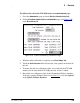
To calibrate the cell on the ICS-2100 touch screen DIAGNOSTIC page:
a. Go to the
DIAGNOSTIC page and touch Electric Conductivity Cell.
b. On the
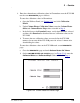
ELECTRIC CONDUCTIVITY CALIBRATION page (see Figure 5-20),
touch
Run Offset Cal.
c. When the offset calibration is complete, touch
Run Slope Cal.
d. Touch the
Cell Constant field and enter the value printed on the front of
the cell.
e. To ensure that the new calibration values are recorded in the ICS-2100
memory, do not turn off the ICS-2100 power for at least 1 minute.
f. Record the new calibration values in the Chromeleon Wellness database.
To do this, open the Wellness Panel (see Section 5.1.1
) and click Upload
under Update Wellness Database.
Figure 5-20. Electric Conductivity Calibration Page