
Home Theater System User Manual




4 • Troubleshooting
Doc. 065291-01 3/09 97
• Cell above or below temperature
Contact Dionex for assistance.
• Damaged piston seal
Replace the piston seal (see Section 5.7
).
4.15 Vacuum Degas Assembly Does Not Run
• Degas option not enabled in Chromeleon
1. Open the Chromeleon Server Configuration program. Right-click the
ICS-2100 device in the timebase and select Properties.
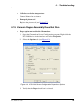
2. Select the Options tab (see Figure 4-3
).
.
Figure 4-3. ICS-2100 Server Configuration Properties: Options
3. Verify that the Degas check box is selected.