
Operation Manual






8
If you want, you can change any of the device keys to
operate another type of device.
Example 1:
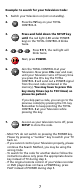
To program a Television on the AUX 2 key
(for example), you need to change the AUX 2 key
into a
TV key, so press:
The AUX 2 key has now become a TV key.
Now enter the Set Up code for your TV
by pressing:
Example 2:
To program a Television on the SAT key (for
example), you need to change the SAT key into a TV
key, so press:
The SAT key has now become a TV key.
Now enter the Set Up code for your TV
by pressing:
To reset the
AUX 2 key to its original mode,
press:
To reset the
SAT key to its original mode,
press:
(*) Press and hold down the SETUP key until
the red light (LED) blinks twice.
(**) The red light (LED) blinks twice.
Changing the Device keys
Resetting a Device key
(*) (**)
(**)
____
(TV code)
(*) (**)
(**)
____
(TV code)
(*) (**)
(*) (**)