
Operation Manual




4 WWW.ONEFORALL.COM
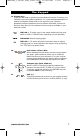
The Keypad
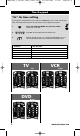
TV
VCR Digits Screen
VCR Main Screen
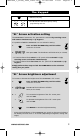
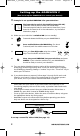
“EL” On time setting
To change the time (default: 8 sec.) that the KAMELEON 3 “EL” screen will be ON,
after each keypress during use of the remote (not programming mode):
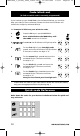
1. Press and hold the MAGIC key until the rabbit
comes out of the hat.
2. Press 9 7 8. The IR Indicator will blink twice.
3. Press 1, 2, 3, 4 or 5 (e.g. 1 = 4 seconds) depending on your
choice, see table below. The IR Indicator will blink twice.
Selection “EL” On Time
14seconds
28 seconds (default)
312seconds
416seconds
520seconds
Text
VCR
DVD
g
Digits
Digits
Kameleon_3_nieuw_2004_11x20 Eur 23-08-2004 12:59 Pagina 4