
User's Manual





22
Section 2 㪥㪫㪣㪧㩷㪠㪛䉶 䊮䉰
RFID System
User's Manual
Section 2
㪥㪸㫄㪼㫊㩷㪸㫅㪻㩷㪝㫌㫅㪺㫋㫀㫆㫅㫊㩷㫆㪽㩷㪚㫆㫄㫇㫆㫅㪼㫅㫋㫊
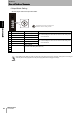
•Output Mode Setting
Set the output mode and output time width.
Mode setting switch setting are read only when the power supply is turned ON. Therefore, settings cannot be changed
while the power is being supplied. Turn the power supply OFF before changing the settings.
The position of the arrow in the figure is the
direction in which the setting is made.
No. Setting Description Combination with access mode
0 10msec OFFDELAY 10-ms ON-delay Auto Mode 1, Auto Mode 3, or Trigger Mode 3
Note: A mode setting error will occur if the access mode setting is not
one of the above.
1 50msec OFFDELAY 50-ms ON-delay
2 500msec OFFDELAY 500-ms ON-delay
3 10 ms 10-ms output Auto Mode 2 or Trigger Mode 3
Note: A mode setting error will occur if the access mode setting is not
one of the above.
4 50 ms 50-ms output
5 CONTINOUS Continuous output
6 - Setting prohibited
(An access mode setting error will occur.)
7
8
9