
User's Manual






Omnia 4.5 Use and Installation Guide – Ver 1.00a
77
77
Checking the Version Number of your Omnia 4.5 Remote Control Program
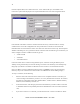
You can check the version of your Omnia Remote Control program by clicking on the "About" option
under the "Help" menu option.
The Omnia 4.5 Remote Control
Version number is shown here.
The Omnia Remote Control "About" screen
While you are configuring the data for the various connection types, the Omnia Remote Control software
can be run without having to connect it to the Omnia-4.5fm.
Start the Omnia45_remote.exe program. As mentioned earlier, when the program is run for the first time,
you will get an error message saying: “No connection database, creating new database.” This is normal.
This message is normal the first time the program is started!