
User's Manual




Omnia 4.5 Use and Installation Guide – Ver 1.00a
15
15
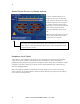
User Interface Tutorial – Input Source Selection and Peak Level Setting
The following two exercises are a useful introduction to the user interface. Start from the Main Menu (as
displayed when the unit is first turned on).
The first exercise changes a parameter selection (the Input Source selection):
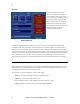
1. If the Menu Display is not showing, press and hold the jog-wheel for two seconds to display it.
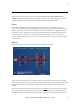
2. Rotate the jog-wheel to highlight Input.
Input Menu
Headphone Level Control
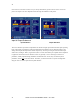
3. Click the jog-wheel (push on the wheel once and release) to bring up the Input window (shown
below).
4. Rotate the jog-wheel until one of the Input Source choices: Analog or AES/EBU is highlighted. The
filled box next to the selection name identifies the current selection. The factory default selection for
Input Source is Analog. To change the selection to AES/EBU, highlight AES/EBU and click. The
AES/EBU box will now be filled and the digital input is now active. If you are using the analog
inputs, highlight Analog and click to reselect the Analog inputs.
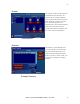
5. Rotate the jog-wheel until the Home icon “H” is highlighted in the lower left corner of the window.
Click to return to the Main Menu.