
Digital Camera Basic Manual


13
En
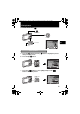
This function allows you to switch the s (scene mode) according to the subject.
1 Set the mode dial to s.
2 Press 12 to select a scene mode, and press e.
Shooting s (Scene) Modes
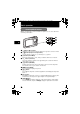
& This mode lets you shoot as close as 10 cm(4 in.) (wide) and 60 cm (23.6 in.)
(tele) from your subject.
% This mode lets you shoot as close as 2 cm (0.8 in.) from your subject.If the
distance between the camera and the subject is over 70 cm (27.6 in.), the picture
will be out of focus.
1 Press 4&.
2 Press 43 to select [&] or [%] and press e.
• PORTRAIT • SELF PORTRAIT • SHOOT & SELECT1
• LANDSCAPE • AVAILABLE LIGHT • SHOOT & SELECT2
• LANDSCAPE+PORTRAIT • SUNSET • BEACH & SNOW
• NIGHT SCENE • FIREWORKS • PRE-CAPTURE MOVIE
• NIGHT+PORTRAIT • CUISINE • UNDERWATER WIDE1
• SPORT • BEHIND GLASS • UNDERWATER WIDE2
• INDOOR • DOCUMENTS • UNDERWATER MACRO
• CANDLE • AUCTION
Modes (Scene)
s
Mode Dial
PORTRAIT
O
K
ME
NU
EXIT
SET
12 button
e button
m button
Macro Mode
d4344-4356_basic_e_00_72.book Page 13 Wednesday, December 12, 2007 5:03 PM