
Digital Camera Basic Manual


11
En
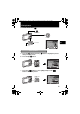
View pictures
a. Set the mode dial to q.
a. Press the 4& button and the 3# button to display the picture
that you want to erase.
b. Press the f/S button.
c. Press the 1 F button to select [YES] and press the e
button to erase the picture.
10
M
10
M
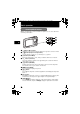
Arrow pad
Next Picture
Prev. Picture
Mode Dial
o button
Erase pictures
f/S button
MENU
OK
IN
SET
YES
CANCEL
ERASE
1 F button
e button
OK
IN
SET
NO
ERASE
YES
YESYES
MENU
CANCEL
YES
d4344-4356_basic_e_00_72.book Page 11 Wednesday, December 12, 2007 5:03 PM