
Operation Manual





Operating Instructions
Edition 06, August 2007
Page 7 of 20Homeplug 8500E Turbo Ethernet Adapter
Uninstallation:
1. Open [Start] −> [Settings] −> [Control Panel] −> [Programs and Features].
2. Select PowerPacket Ethernet Adapter.
3. Click the [Uninstall/Change] button.
4. Follow the instruction on the screen to uninstall the utility.
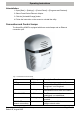
Connection and Control Lamps
The HomePlug 8500E is equipped with three control lamps and an Ethernet
connection port.
Fig. 2 Connection and control lamps
Label LED lamp Description / Function
PWR On/Off Switch the power supply on/off
PL-ACT On/Off Another HomePlug device has been
recognised / not recognised.
Flashing lamp The PL−ACT indicator flashes when data
transmission occurs within the network.
ETH-LINK/ACT On/Off The Ethernet connection is
established / not established.
Flashing lamp The LED flashes when data is sent or
received.
ETHERNET
(network connection)
Supports the use of both cross or
straight network cable.