
Operation Manual




- 76 -
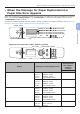
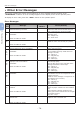
When the Message for Replacement of Consumables or Maintenance Unit Appears
3
3. Troubleshooting
Status Message on the Display Screen
Message displayed
after the <HELP>
button is pressed
Reference Page or
Remedy
Error Code
Fuser Unit 1st Line xxx - Prepare a fuser unit, and
replace the old fuser unit with
new one after a message for
replacement of consumables
or maintenance unit appears.
2nd Line Fuser Unit Near Life
1st Line xxx - page 103
2nd Line Change Fuser Unit
1st Line Install New Fuser Unit 354 page 103
You can continue to print by
opening or closing the front
cover for a while. However
replace the fuser unit soon.
Otherwise, it may cause a
printer error or paper jam.
2nd Line Fuser Unit Life
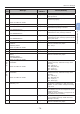
Belt Unit 1st Line xxx - Prepare a belt unit, and
replace the old belt unit with
new one after a message for
replacement of consumables
or maintenance unit appears.
2nd Line Belt Unit Near Life
1st Line xxx - page 100
2nd Line Change Belt Unit
1st Line Install New Belt Unit 355 page 100
You can continue to print by
opening or closing the front
cover for a while. However
replace the belt unit soon.
Otherwise, it may cause a
printer error.
2nd Line Belt Unit Life