
Operation Manual




- 75 -
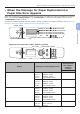
When the Message for Replacement of Consumables or Maintenance Unit Appears
3
3. Troubleshooting
Memo
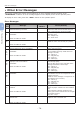
● “xxx” described on the list below changes according to the printer status.
Status Message on the Display Screen
Message displayed
after the <HELP>
button is pressed
Reference Page or
Remedy
Error Code
Toner Cartridge 1st Line xxx - Prepare a new toner
cartridge, and replace the
old toner cartridge with new
one after a message for
replacement of consumables
or maintenance unit appears.
2nd Line %COLOR% Toner Low
1st Line xxx - page 93
2nd Line %COLOR% Toner Empty
1st Line xxx - page 93
2nd Line %COLOR% Toner Empty
1st Line Install Toner 410, 411, 413 page 95 (White toner)
2nd Line %COLOR% 412 page 93
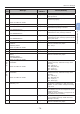
Image Drums 1st Line xxx - Prepare new image drums,
and replace the old image
drums with new ones after a
message for replacement of
consumables or maintenance
unit appears.
2nd Line %COLOR% Image Drum Near
Life
1st Line xxx - page 97
2nd Line %COLOR% Image Drum Life
1st Line xxx - page 97
The number of pages you can
print is displayed in “nnn”.
2nd Line %COLOR% Image Drum Life,
%nnn% Pages Left
1st Line xxx - page 97
2nd Line %COLOR% Image Drum Life
1st Line Install New Image Drum 350, 351, 352, 353 page 97
If a toner remains, you can
continue to print by opening
or closing the front cover.
However, replace the image
drum soon. Otherwise, it may
cause a decrease in a printing
quality.
2nd Line Image Drum Life
3rd Line %COLOR%
1st Line Install New Image Drum 560, 561, 562, 563 page 97
2nd Line Image Drum Life
3rd Line %COLOR%
1st Line Install New Image Drum 564, 565, 566, 567 page 97
2nd Line Image Drum Life
3rd Line %COLOR%
4th Line To Exceed the Life, Press
Online Button
1st Line Install New Image Drum 680, 681, 682, 683 page 97
2nd Line Printing disabled due to low
threshold of Image Drum life.
3rd Line %COLOR%