
Operation Manual





- 44 -
Connecting to a Computer
1
1. Setup
When Adding Options
If options such as SD memory card kit has been
installed, use following procedures to change
printer driver settings.
For Windows PS Printer Driver
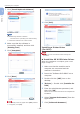
1
Click [Start] > [Devices and Printers].
2 Right-click the [Pro8432WT] icon
and then select [Printer Properties].
(If you have installed multiple printer
drivers, select [Printer Properties] >
[Pro8432WT PS].)
3 Select the [Device Settings] tab.
4 If using a network connection, select
[Get installed options automatically]
under [Installable Options], and then
click [Setup].
5 Click [OK].