- 18 -
Preparing Your Printer
1
1. Setup
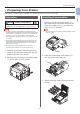
4 Remove the protective sheets and toner
covers from four image drums.
x4 (C / Y / M / W)
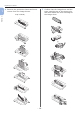
5 Conrm that the image drum and the
toner cartridge are of the same color,
and then attach the toner cartridge to
the image drum.