
Operation Manual






- 14 -
Operator Panel
1
1. Setup
9
10
11
12
13
14
15
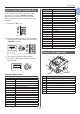
No. Name
9 Output tray open button
10 Toner cartridge
Image drum (C: cyan)
11 Toner cartridge
Image drum (Y: yellow)
12 Toner cartridge
Image drum (M: magenta)
13 Toner cartridge
Image drum (W: white)
14 Fuser unit
15 LED head (four heads)
16
17
26
No. Name
16 Multipurpose tray
17 Paper set cover
26 Wireless LAN module cover
18
19
20
21
No. Name
18 Rear output tray
19 AC power socket
20 Interface part
21 Access cover
● Interface part
23
24
25
No. Name
23 Accessory connector
24 USB interface connection
25 Network interface connection