
Extra Information





- 9 -
1
1. Convenient Print Functions
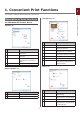
[Paper Feed] panel
Item
Description
All Pages From Species the tray for the
paper feed. The tray is
selected automatically when
[Auto Select] is specied.
First Page From Select to print from the tray
that species the header
page.
Remaining From Prints from the tray that
species the remaining
pages.
[Cover Page] panel
Item
Description
Print Cover Page Species cover printing.
Cover Page Type Species the text during
printing.
[Color] panel
Item
Description
Gray Scale (White)
Print
Prints the data created as
grayscale in the application
with the white toner only.
Color Print Species alignment to color
mode when printing in color.
[Print Options] panel
Item
Description
Print Options
Species alignment to the items
that have been set such as
print quality, paper type, etc.
Items Setup
Species the setup items
conforming to the print setup tab.