
Extra Information






- 60 -
OS X Utilities
4
4. Using Utility Software
OS X Utilities
This section explains utilities you can use in OS X.
Network Card Setup
You can use the Network Card Setup to
congure the network.
In order to use Network Card Setup, TCP/IP
needs to be activated.
Note
● Congure the TCP/IP settings.
Conguring the IP Address
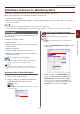
1 Start Network Card Setup.
Reference
● “Installing Utilities” P.52
2 Select this machine from the list.
3 Select [IP Address Settings] from the
[Operations] menu.
4 Change other settings if necessary, and
then click [Save].
5 Enter the administrator password, and
then click [OK].
- The factory default password is “999999”.
- The password is case sensitive.
6 Click [OK] to enable new settings.
The network card of this machine restarts.
Conguring Web Settings
You can launch the web page, and congure the
printer network settings.
Enabling Web Settings
1 Start Network Card Setup.
Reference
● “Installing Utilities” P.52
2 Select this machine from the list.
3 Select [Web Settings] from the
[Operations] menu.
4 Check [Device web settings will be
enabled], and then click [Save].
5 Enter the administrator password, and
then click [OK].
- The factory default password is “999999”.
- The password is case sensitive.
6 Click [OK] in a conrmation window.
Opening a Web page
1 Start Network Card Setup.
Reference
● “Installing Utilities” P.52
2 Select this machine from the list.
3 Select [Show Device Web page] from
the [Operations] menu.
The Web page opens, and the machine status
page is displayed.
Quitting Network Card Setup
1 Select [Quit] from the [Network Card
Setup] menu.