
Extra Information





- 47 -
Changing the Equipment Settings
3
3. Changing Printer Settings
Item Settings Explanation
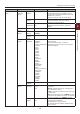
Change Password New Password xxxxxxxxxxxxxx Sets a new password to enter Admin Setup
menu.
From 6 to 12 alpha/numeric digits can be
entered.
Verify password xxxxxxxxxxxxxx Forces the User to input the new password
to enter Admin Setup.
From 6 to 12 alpha/numeric digits can be
entered.
Calibration
Item Settings Explanation
Auto Density
Mode
On/Off Selects whether density adjustment and TRC
compensation is automatically performed.
[On]: Density adjustment is automatically run
under the engine-specied conditions, and
reected in TRC compensation.
[Off]: The printer does not voluntarily run
density adjustment.
Adjust Density Execute If Execute is selected, the printer will immediately
adjust density and reect it in TRC compensation.
This adjustment must be executed when
the printer is idling. It can become invalid if
executed in any other state.
Adjust
Registration
Execute When this menu is selected, the printer performs
AutoAdjust Registration.
This adjustment must be executed when the
printer is idling.
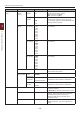
Color Density Cyan/Magenta/
Yellow/White
Density
-3,-2,-1,
0,+1,+2,+3
Adjusts the engine density.
Print Tuning
Pattern
Execute Prints the pattern for the user to adjust TRC.
Ordinarily, this function is not needed
because TRC is automatically adjusted to the
recommended levels through density adjustment
and TRC compensation.
Adjustment results will be reected as offset
values (addition) to the corrections through the
Adjust Density/TRC Compensation function.
Cyan/Magenta/
Yellow Tuning
Highlight -3,-2,-1,
0,+1,+2,+3
Adjusts highlight (light area) of the TRC.
+ = Darker
- = Lighter
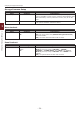
Mid-Tone -3,-2,-1,
0,+1,+2,+3
Adjusts mid-tone area of the TRC.
+ = Darker
- = Lighter
Dark -3,-2,-1,
0,+1,+2,+3
Adjusts dark area of the TRC.
+ = Darker
- = Lighter