
Extra Information





- 46 -
Changing the Equipment Settings
3
3. Changing Printer Settings
Item Settings Explanation
Others Setup
(cont.)
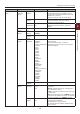
Job Cancel
Setup
(cont.)
Focus
Position
Yes
No
Sets whether to focus on [Yes] or [No] in
the job cancel inquiry screen.
[Yes]: Focuses on [Yes].
[No]: Focuses on [No].
Display
Timeout
60
~
180
~
300
Sets the display timeout value of the job
cancel inquiry screen. If timeout occurs,
the canceling operation will be disabled and
printing will be executed.
Near Life
Setup
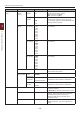
Drum Near
Life Timing
500
1000
1500
2000
2500
3000
3500
4000
4500
5000
Sets the timing of displaying the Drum Near
Life warning.
Fuser Near
Life Timing
500
1000
1500
2000
2500
3000
3500
4000
4500
5000
Sets the timing of displaying the Fuser Near
Life warning.
Belt Near
Life Timing
500
1000
1500
2000
2500
3000
3500
4000
4500
5000
Sets the timing of displaying the Belt Near
Life warning.
Erase Privacy Data Execute Erase the registered privacy data and the
stored data in the printer.
Business
Phone Setup
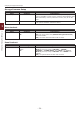
Business
Phone
Cooperation
Enable
Disable
Enables/Disables the CrosCore cooperation.
Connection
IP Address
0.0.0.0
~
255.255.255.255
Sets the IP address of the connection
destination of the CrosCore cooperation.
Connection
Port No.
1
~
65535
Sets the port number of the connection
destination of the CrosCore cooperation.
Settings Reset Settings Execute Resets EEPROM of CU. Resets User menu to
the factory default.
If [Execute] is selected, exits from the menu.
Save Settings Execute Saves menus currently set. With this
function, the menus with which operation
was last performed are saved, and
overwrites with the menus that were
previously saved.
Restore Settings Execute Changes to the menu setting saved.
Display Condition: The menu settings are
saved.