
Extra Information





- 41 -
Changing the Equipment Settings
3
3. Changing Printer Settings
Item Settings Explanation
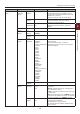
Network Setup
(cont.)
Gigabit Network Enable
Disable
Sets whether to support a gigabit network.
When it is disabled, 1000Base-T Full/Half
duplex connection cannot be made.
Hub Link Setting Auto Negotiate
100Base-TX Full
100Base-TX Half
10Base-T Full
10Base-T Half
Sets a method to link to a HUB. When
Auto is set, a connection method to a HUB
is selected automatically and attempts to
connect.
If another method is selected, attempts
to connect to a HUB only by the selected
connection method.
Network Factory
Defaults
Execute Species whether to initialize the network
factory default settings for the Network.
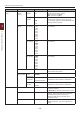
USB Setup USB Enable/Disable Enable/Disable the USB port.
Speed 480/12 Mbps Selects the interface speed. After setting
change the menu, the printer restarts on exit.
Soft Reset Enable/Disable Enables/Disables the Soft Reset command.
Serial Number Enable/Disable Species whether to ENABLE or DISABLE a
USB serial number.
The USB serial number is used to identify
the USB device connected to your PC.
Ofine Receive Enable/Disable Ofine receive.
USB Memory Interface Enable/Disable Sets enable/disable of USB memory I/F.
Connected Host Normal
Specic
If the printer is connected to a specic host
by USB, set it to [Specic] to print from
this specic host.
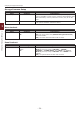
Print Setup Personality Auto
PostScript
PCL
Selects a printer language.
Copies 1-999 Selects the number of copies.
This setting is disabled for Local Print except
for Demo Page.
Media Check Enable
Disable
Sets whether the printer checks the
matching of printed data size and that of the
tray. Only standard sizes are checked.
A4/Letter Override No/Yes When the A4 size is specied in the driver
but there is no tray set for A4 in the printer,
the printing will be done from the tray with
Letter paper loaded without a paper request.
When the Letter size is specied in the
driver but there is no tray set for Letter in
the printer, the printing will be done from
the tray with A4 paper loaded without a
paper request.
* There is no switching from the printer
driver.
Resolution 600dpi
600x1200dpi
600dpi multi-level
Sets default resolution.