
Extra Information





- 36 -
Changing the Equipment Settings
3
3. Changing Printer Settings
Menus
Item Action Explanation
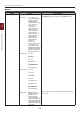
Tray Conguration MPTray Cong
Paper Size:
A3/A4 /A4 /A5 /
A5 /A6/B4/B5 /B5 /
B6 /B6 /B6 Half/
Legal14/Legal13.5/
Legal13/Tabloid/Letter
/
Letter /Executive/
8.5” SQ/Folio/
4x6 inch/5x7 inch/
16K(184x260mm)
/
16K(195x270mm) /
16K(197x273mm) /
16K(184x260mm) /
16K(195x270mm) /
16K(197x273mm) /
8K(260x368mm)/
8K(270x390mm)/
8K(273x394mm)/
Statement
/
Statement /
Custom/Com-10 Envelope/
DL Envelope/C5/C4/
Hagaki/Oufuku Hagaki/
Nagagata#3/Nagagata#4/
Nagagata#40/Yougata#0/
Yougata#4/Kakugata#2/
Kakugata#3/Index Card
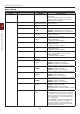
X Dimension: 2.5inch
~
8.3inch
~
8.5inch
64millimeter
~
210millimeter
~
216millimeter
Y Dimension: 5.0inch
~
11.0inch
~
11.7inch
~
52.0inch
127millimeter
~
279millimeter
~
297millimete
~
1321millimeter
Congure Paper Size/Media Type/Media Weight/
Tray Usage. Select by scroll and <Enter> button.
Media Type:
Plain/Letterhead/
Transparency/Labels/
Bond/Recycled/
Card Stock/Rough/
Glossy/USERTYPE1/
USERTYPE2/USERTYPE3/
USERTYPE4/USERTYPE5/
USERTYPE6/USERTYPE7/
USERTYPE8/USERTYPE9/
USERTYPE10
USERTYPE 1 to 10 are displayed only if registered in
the host PC.