
Extra Information





- 35 -
Changing the Equipment Settings
3
3. Changing Printer Settings
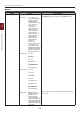
Print Information Menu
This menu provides a quick method of listing various items stored within the printer.
Item Action Explanation
Conguration Execute Select execute to print out a conguration report.
Network Execute Scroll down to this parameter and select execute to print out
Network information.
Demo Page
DEMO1 Execute Scroll down to this parameter and select execute to print out a
demonstration page.
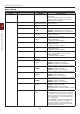
File List Execute Scroll down to this parameter and select execute to print out a
list of job les.
(Displayed only if FileSystem is installed).
PS Font List Execute Scroll down to this parameter and select execute to print out a
Postscript emulation typeface list.
Error Log Execute Scroll down to this parameter and select execute to print out
the error log.
Color Prole List Execute Scroll down to this parameter and select execute to print out a
list of colour proles.
Job Log Execute Prints a job history.