
Extra Information





- 32 -
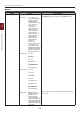
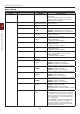
Changing the Equipment Settings
3
3. Changing Printer Settings
Other Settings
1 Press the scroll button or to open
the equipment setting menu.
2 Press the scroll button to select the
setup menu on which you want to
change a setting and then press the
<ENTER> button.
3 Change the setting and then press the
<ENTER> button.
4 Press the <ON LINE> button to exit the
menu mode.