
Extra Information





- 31 -
Changing the Equipment Settings
3
3. Changing Printer Settings
Changing the Equipment Settings
This section explains the basic procedure to change the equipment settings.
Reference
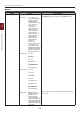
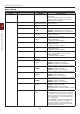
● For details on the menu structure of the equipment settings, refer to “List of Each Setup Menu” P.33.
Admin Setup
To enter the [Admin Setup] menu, an
administrator password is necessary.
Memo
● The default password is “999999”.
1 Press the scroll button or to open
the equipment setting menu.
2 Press the scroll button to select
[Admin Setup] and then press the
<ENTER> button.
3 Enter the administrator password using
the ten-key pad.
4 Press the <ENTER> button.
5 Press the scroll button to select the
setup menu on which you want to
change a setting and then press the
<ENTER> button.
6 Change the setting and then press the
<ENTER> button.
7 Press the <ON LINE> button to exit the
menu mode.
Boot Menu
Boot Menu is used to change system settings.
Only the administrator should use this menu.
To enter [Boot Menu] menu, an administrator
password is necessary.
Memo
● The default password is “999999”.
1 Hold down the <ENTER> button and
press power switch.
2 Press the <ENTER> button.
3 Enter the administrator password using
the ten-key pad.
4 Press the <ENTER> button.
5 Press the scroll button to select the
setup menu on which you want to
change a setting and then press the
<ENTER> button.
6 Change the setting and then press the
<ENTER> button.
7 Press the <ON LINE> button to exit the
menu mode.