Operation Manual
Manuals
Brands
Oki Manuals
Printer
MC363dn
51
52
53
54
55
56
57
58
59
60
Scanning > 52
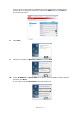
11.
If
Search MFP
is selected, select the machi
ne and click
Next
.
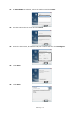
12.
Set the sca
nner driver name and clic
k
Next
.
13.
Enter the host name, IP address
and port number and then click
Configure
.
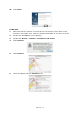
14.
Click
Next
.
15.
Click
Next
.
1
...
...
50
51
52
53
54
...
...
145