
Quick Start Guide


Copying > 38
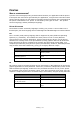
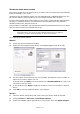
2. Use the following table to guide you as to how to load the document(s) to be copied.
Refer to loading instructions on page 29 and page 30.
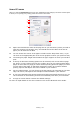
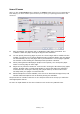
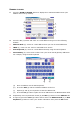
3. At the Copy Mode touch screen:
(a) Press the Simplex/Duplex (1) button and select Simplex (1 to 1 side) or
Duplex (2 to 2 sides) for single-sided or two-sided copying respectively.
(b) Press the Color Mode (2) button and select Color or Black & White as required.
(c) Use the numeric keys adjacent to the touch screen to set the required number
of copies (3).
4. Press the START button to generate your copies at the printer unit.
I
NCREASED
PAPER
SAVING
For increased paper saving, consider as an example printing 2-up (i.e. two A4 sides reduced
onto one A4 side) and duplex which can reduce four single-sided A4 sheets to one two-
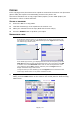
sided A4 sheet. You can set 2-up in the N-up section on the Copy Mode Details tab. To
obtain the desired orientation of sides in the resulting sheet, ensure that you select:
> the correct setting (Top/Top or Top/Bottom) while setting the Simplex/Duplex
function
> the correct orientation of paper in the ADF
in accordance with the icons that appear in the Simplex/Duplex and N-up panels
respectively.
JOB SIMPLEX/DUPLEX GLASS/ADF
Single page Simplex Glass
Duplex ADF
Multi-page document
or many documents
Simplex ADF
Duplex ADF
NOTE
Unless you specifically need to change a setting, leave it at its default value
or AUTO.
2 1
3