
User's Manual




FunctionComponentNr
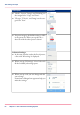
When you tap on the active job, the jobs queue window
opens.
•
You can see all the listed jobs, and access them when
you tap the job settings.
•
You can also move them up or down the list with the
arrows on the right side.
jobs queue3.
system menu
1
2
#
FunctionComponentNr
•
The loaded media in the printer is displayed.
•
When you tap the drawer you can change the media
settings.
•
Wizards appear, to help you change media or refill toner.
Printing sys-
tem and media
1.
Chapter 2 - Get to Know the Printing System60
The jobs queue and the system menu